Sheet music
Read the music while you play it.
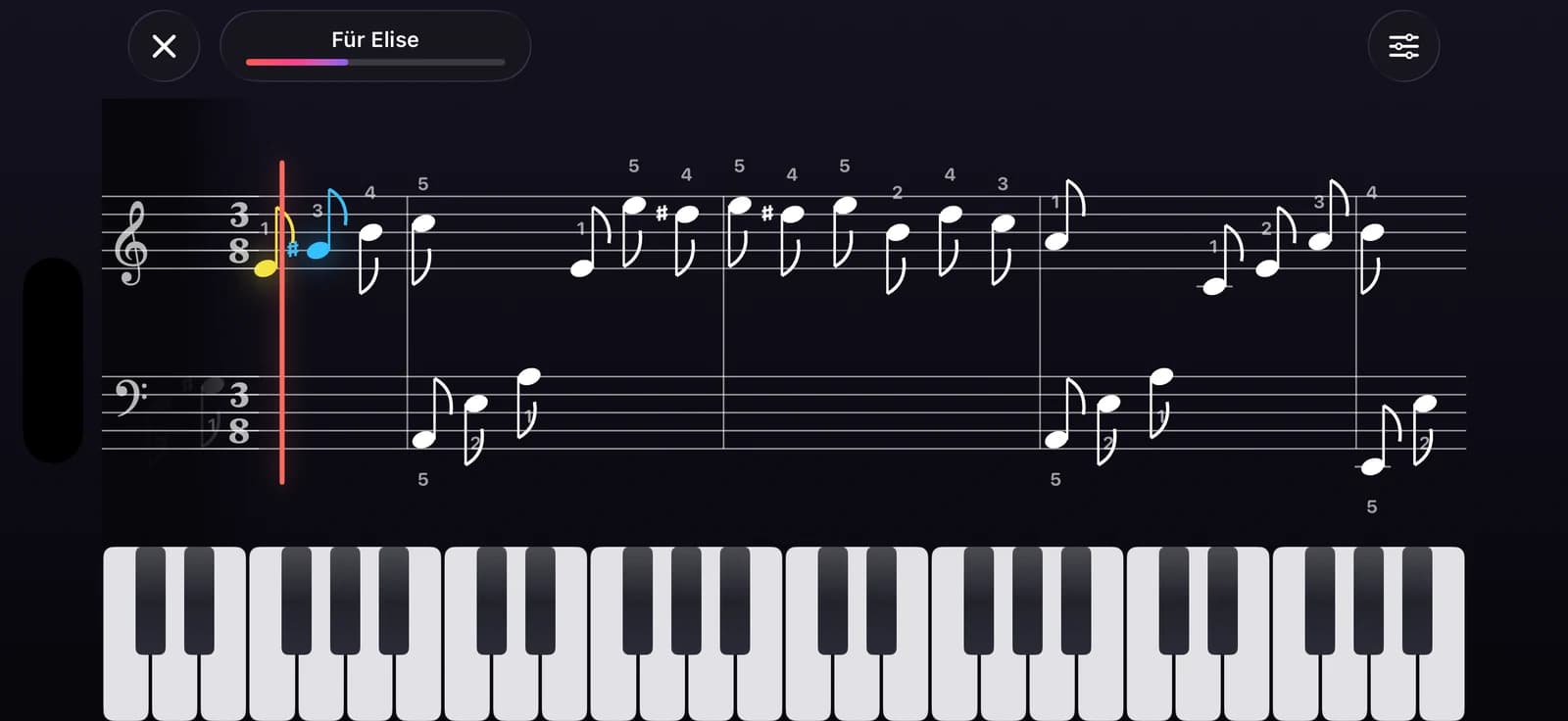
Melody+ scrolls real notation past a play line while it listens. Every note you play right lights up, so reading turns into playing.
iPhone · iOS 18 or later · Android 9 or later
Notation for every instrument
Grand staff for piano
Treble and bass clefs together, scrolling at the song's tempo, with the right or left hand alone if you choose.
Saxophone in written pitch
The part is written for your horn (alto, tenor, soprano or baritone) with the fingering of each note beside it, and a concert-pitch staff when you want it.
Violin with string and finger
A fingerboard under the staff shows which string and finger each note needs.
A course for reading
Reading the Staff (8 lessons) teaches piano notes on the staff step by step, and Note Rush and Flash cards drill them.
Learn to read, one step at a time
Start with falling notes
Get the song into your hands first.
Switch to sheet music
Play the same song from the staff; the notes you already know make reading easier.
Drill the notes
Note Rush gives you 60 seconds to name notes on the treble or bass clef.
Notation in Melody+
- Grand staff (piano)
- Treble and bass clef
- Written pitch (saxophone)
- Concert-pitch staff
- Staff with fingerboard (violin)
- Jianpu (đàn tranh)
- Number tab (kalimba)
Free and Pro
Free
Sheet music in every song you can open (the First Steps course and every beginner song), plus Note Rush and Flash cards.
Pro
Reading the Staff and the other courses, and every song at every level.
Questions
Can I learn to read music with Melody+?
Yes. Switch any piano song to sheet music, take the Reading the Staff course and practise with Note Rush and Flash cards. Saxophone and violin songs are always shown as sheet music.
Why is the saxophone music in a different key?
Saxophones are transposing instruments. Melody+ writes the part in the written pitch for your horn, as a band part would be, and listens for the concert pitch it sounds at. You can also show a concert-pitch staff.
Can I print the sheet music?
No. The notation is shown in the app while you play; Melody+ doesn't offer printable or downloadable scores.
More in Melody+
Falling notes
Coloured notes fall onto the keys as you play, with the note names on the keyboard.
Guitar tab
Scrolling tab with chord cards, strum arrows and technique marks, on six strings or four for ukulele.
Wait for me
The song stops on every note until you play it, then moves on: learn at your own pace.
MIDI keyboard
Connect a digital piano or MIDI keyboard over USB or Bluetooth (and Wi-Fi on iPhone) for exact timing.
Your first song is a few minutes away.
Pick up your piano, guitar, ukulele, saxophone or violin, open Melody+ and play a note. It will light up.


iPhone · iOS 18 or later · Android 9 or later