Electric guitar
Plug in, turn it up, bend that note.
Connect your electric guitar through an audio interface, put on wired headphones and play through an amp with drive and pedals. Then train the moves that make lead guitar sing: bends that land in tune, steady vibrato and tab that shows every technique.
iPhone · iOS 18 or later · Android 9 or later
Your rig and your technique
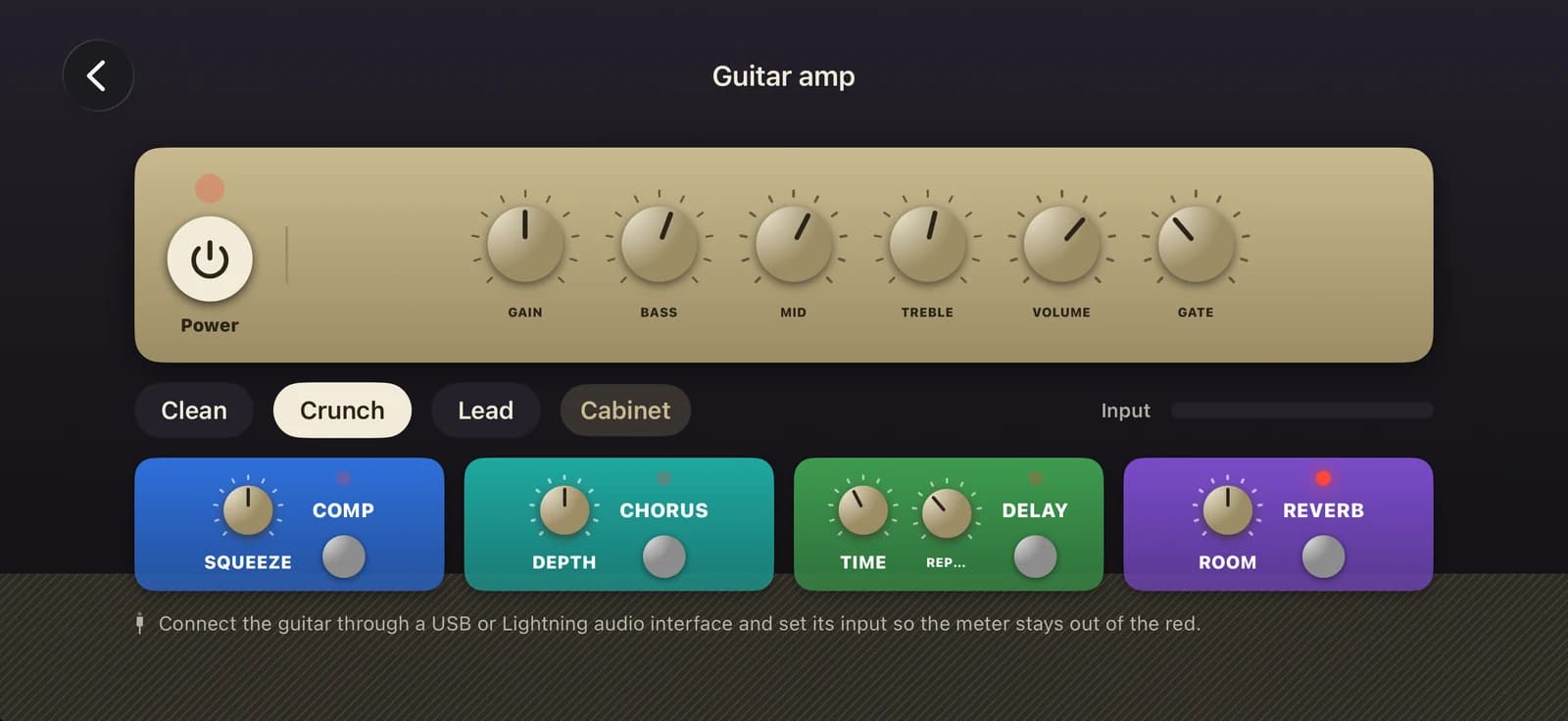
An amp in your iPhone
Gain, bass, mid, treble, volume and a noise gate, with a drive stage and a speaker cabinet. Start from the Clean, Crunch or Lead preset and shape it from there.
Four pedals
Compressor, chorus, delay and reverb stompboxes in the chain, each with its own controls. The presets switch the right ones on for you.
Low-latency live input
Your guitar goes in and comes out in the same short audio cycle, so the sound keeps up with your fingers. The screen shows the input level and the estimated delay.
Made for headphones
The amp plays through wired or USB headphones only: the speaker would howl and Bluetooth is too slow to play through. Unplug them and the amp switches itself off.
Bends & vibrato trainer
Choose a half, full or one-and-a-half step bend, or vibrato, on strings 1 to 3. A live graph shows your pitch in cents, and every attempt gets stars and a tip such as “bend 20 cents further”.
Tab with every technique
Bends and release bends, vibrato, hammer-ons, pull-offs, slides, palm mutes and harmonics are marked on the tab, and Listen plays them back so you hear how they should sound.
From plugging in to playing lead
Plug in
Connect your guitar through a USB or Lightning audio interface and plug in wired headphones.
Dial in your tone
Pick Clean, Crunch or Lead, set the input so the meter stays out of the red, then shape the knobs and pedals.
Train your lead moves
Bend into the target band in the trainer, then play the Lead Guitar Moves exercise with bends, slides and vibrato.
Amp and pedals
- Clean
- Crunch
- Lead
- Gain
- Bass
- Mid
- Treble
- Noise gate
- Cabinet
- Compressor
- Chorus
- Delay
- Reverb
Techniques on the tab
- ½, full and 1½ step bends
- Pre-bend and release
- Vibrato
- Hammer-on
- Pull-off
- Slide
- Palm mute
- Natural harmonic
- Let ring
Free and Pro
Free
The Guitar amp with every preset and pedal, the Bends & vibrato trainer, the guided tuner, and technique marks in every song you can open.
Pro
The Lead Guitar Moves exercise, the other guitar courses and the full song library.
Questions
What do I need to play through the amp?
An electric guitar, an audio interface that connects to your iPhone over USB or Lightning, and wired or USB headphones. Set the interface's input level so the meter in Melody+ stays out of the red.
Why can't I use the speaker or Bluetooth headphones?
With a guitar plugged in, the iPhone speaker would feed back into the pickups and howl, and Bluetooth adds too much delay to play through. Melody+ only turns the amp on with wired or USB headphones, and turns it off if you unplug them.
How does the trainer know how far I bend?
It follows the pitch of your note through the microphone about 90 times a second and compares it with the target in cents. A bend counts when it reaches the target band quickly and holds there; vibrato is measured by how fast and how wide it is.
Can I practise bends on an acoustic guitar?
Yes. The Bends & vibrato trainer listens through the microphone, so it works with an acoustic guitar, or with an electric guitar played through an amp the iPhone can hear.
More in Melody+
Piano
Falling notes, sheet music and lessons that listen to your real piano or keyboard.
Guitar
Chords checked by the microphone, flash chords, What chord?, tab and a guided tuner with 8 tunings.
Ukulele
4-line tab, ukulele chords checked by the microphone, island and chuck strums, and two courses.
Saxophone
Sheet music in written pitch with fingerings, a reed voice, a sax tuner, long tones and two courses.
Đàn tranh
A full-screen zither with Vietnamese modes, jianpu lessons and a mode that hears your own zither.
Drums
A full acoustic kit on your screen, with touch velocity, lessons that wait for you, backing loops and recording.
Beat Maker
16 pads in two banks, a step sequencer with swing, four kits, a kit builder and performance effects.
DJ Mixer
Two decks with turntables you can scratch, sync, key lock, Automix, effects, recording, a DJ course and a quiz.
Your first song is a few minutes away.
Pick up your piano, guitar, ukulele or saxophone, open Melody+ and play a note. It will light up.

iPhone · iOS 18 or later · Android 9 or later