Guitar tab
Tab that scrolls, listens and waits.
Fret numbers glide along the strings to the play line, with the chord you're on and the next one beside them. Melody+ checks every note and strum, and waits if you need a moment.
iPhone · iOS 18 or later · Android 9 or later
More than numbers on lines
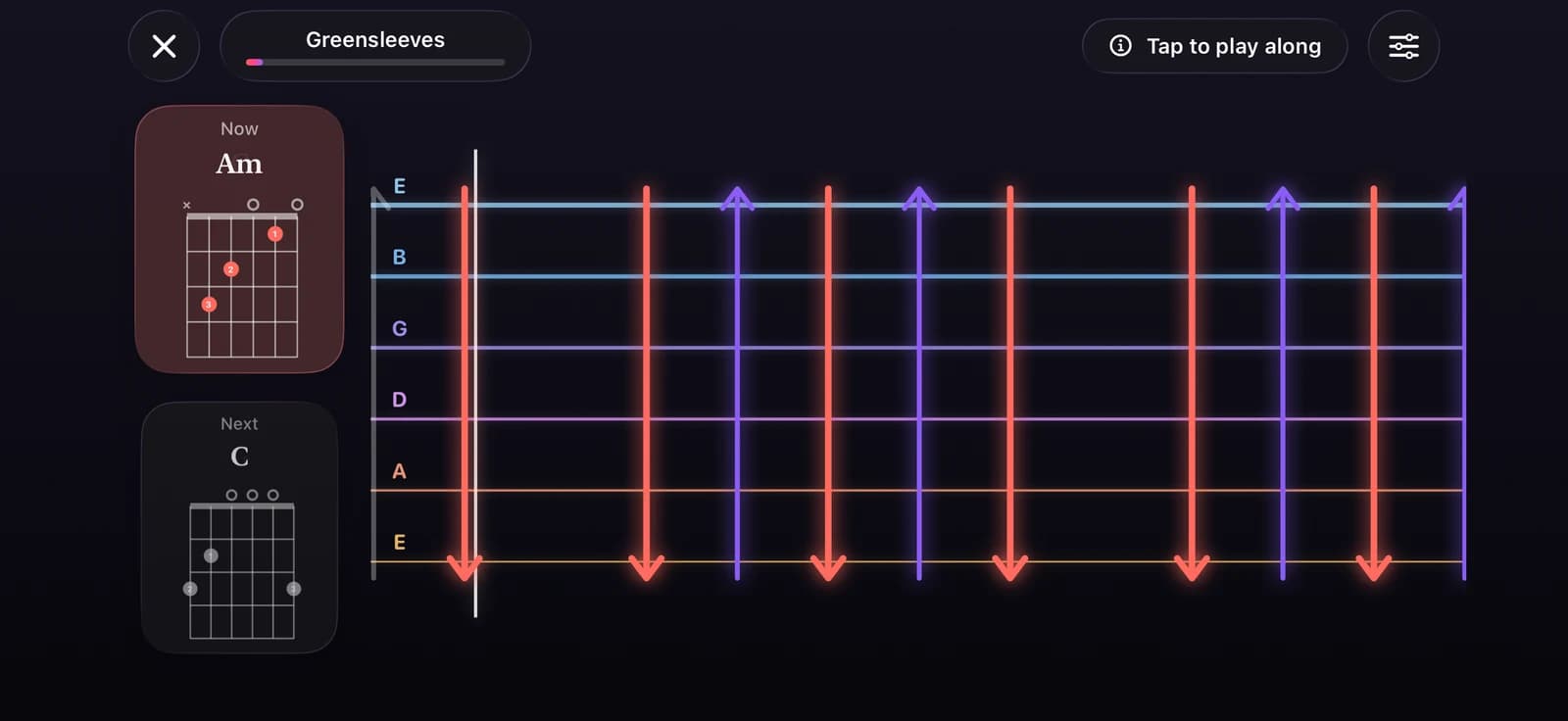
Chord now and next
A chord card shows the shape you're playing and the one coming up, so changes never surprise you.
Strum arrows
Down and up strokes travel on the strings in time, including muted chucks.
Technique marks
Bends (½, full and 1½ step), pre-bends and releases, vibrato, hammer-ons, pull-offs, slides, palm mutes, natural harmonics and let ring are marked and played back in Listen.
Four-line ukulele tab
Ukulele songs use tab on four strings in G C E A, with the re-entrant high G drawn where it really is.
Notes and strums checked
Single notes are followed by pitch; strums are checked against the chord shape through the microphone.
Reading tab in Melody+
Each line is a string
The bottom line is the low E string; numbers say which fret to press.
Follow the chord card
Strum songs show the chord shape, so you don't have to read every number.
Listen, then play
Hear the song with its bends and slides, then play it with Wait for me or in time.
Technique marks
- Bend ½, full, 1½
- Pre-bend and release
- Vibrato
- Hammer-on
- Pull-off
- Slide
- Palm mute
- Natural harmonic
- Let ring
Free and Pro
Free
Tab, chord cards and technique marks in the First Steps course and every beginner guitar and ukulele song.
Pro
The other guitar and ukulele courses and every song at every level.
Questions
How do you read guitar tab?
Tab has one line per string, the lowest string at the bottom. A number is the fret to press on that string, 0 is an open string, and numbers stacked on top of each other are played together. Our guide on reading guitar tab explains the marks for bends and slides.
Does Melody+ hear bends and slides?
Melody+ follows the pitch of the notes you play. The Bends & vibrato trainer checks how far you bend, in cents, against the target.
More in Melody+
Falling notes
Coloured notes fall onto the keys as you play, with the note names on the keyboard.
Sheet music
A scrolling staff for piano, saxophone and violin, with fingerings, and a course that teaches you to read it.
Wait for me
The song stops on every note until you play it, then moves on: learn at your own pace.
MIDI keyboard
Connect a digital piano or MIDI keyboard over USB or Bluetooth (and Wi-Fi on iPhone) for exact timing.
Your first song is a few minutes away.
Pick up your piano, guitar, ukulele, saxophone or violin, open Melody+ and play a note. It will light up.


iPhone · iOS 18 or later · Android 9 or later