Tuner
In tune before the first note.
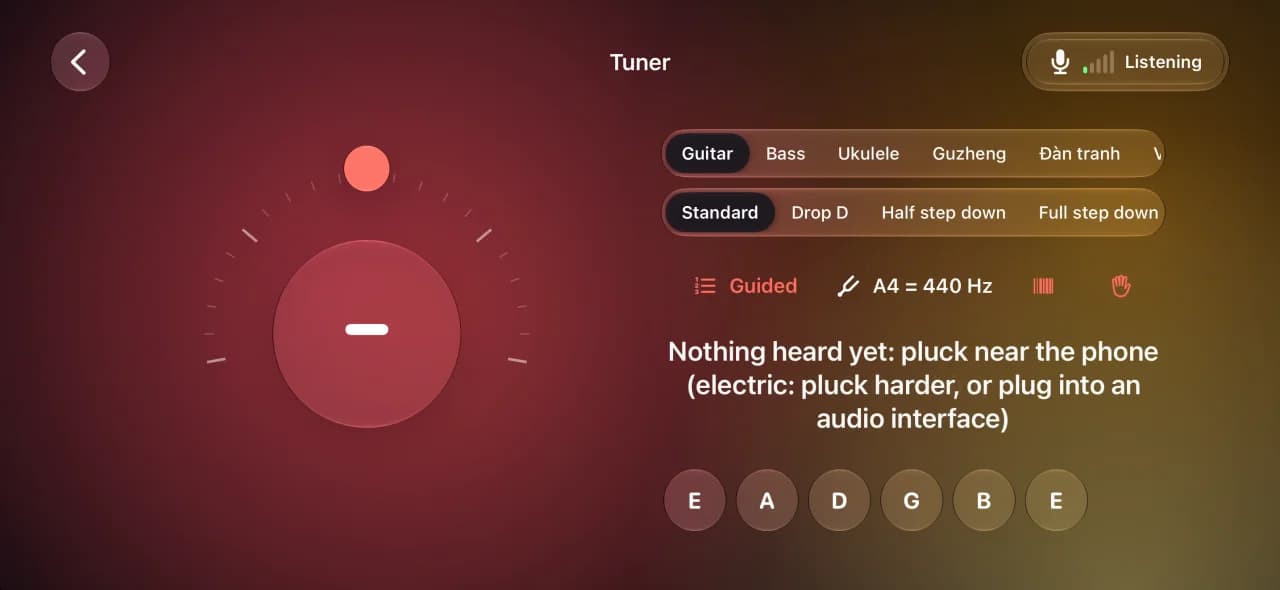
Play a string and the tuner shows the note and how many cents sharp or flat you are. For guitar, the guided mode takes you through each string and moves on when it holds in tune.
iPhone · iOS 18 or later · Android 9 or later
One tuner, many instruments
Guided guitar tuning
String by string: it moves on once a string holds in tune and warns you if you play the wrong one. Tap a string to hear its note.
Ten guitar tunings
Standard, Drop D, half step down, full step down, Drop C, Open G, Open D, DADGAD, 7-string and baritone.
Bass, ukulele and more
4-, 5- and 6-string bass and drop D bass, ukulele (standard, low G, baritone), violin, viola, cello, double bass, banjo, mandolin and kalimba.
Saxophone and zither
A chromatic sax tuner named in written pitch for alto, tenor, soprano or baritone, and đàn tranh and guzheng tunings, Vietnamese modes included.
Reference pitch and strobe
Set A4 anywhere from 415 to 466 Hz (440 by default) and switch to a strobe display for fine tuning.
Tune a guitar
Pick the tuning
Standard is E A D G B E, from the thickest string.
Play one string
Let it ring; the needle shows flat (left) or sharp (right).
Turn the peg
Stop when it's in tune; the guided mode moves to the next string.
Guitar tunings
- Standard
- Drop D
- Half step down
- Full step down
- Drop C
- Open G
- Open D
- DADGAD
- 7-string
- Baritone
Other presets
- Bass (4, 5, 6 strings, drop D)
- Ukulele (standard, low G, baritone)
- Violin
- Viola
- Cello
- Double bass
- Banjo
- Mandolin
- Kalimba
- Đàn tranh and guzheng
- Saxophone
Free and Pro
Free
The whole tuner, every preset and the reference pitch.
Pro
Nothing to unlock: tools are always free.
Questions
Is the Melody+ tuner free?
Yes. Every tool in Melody+, the tuner included, is free with no ads.
What does A4 = 440 Hz mean?
It's the reference pitch the tuner measures against. Most music uses 440 Hz; some orchestras and older recordings use 442 or 415. You can set any value from 415 to 466 Hz.
Can it tune a ukulele with a low G?
Yes. Choose the low-G ukulele preset; there are also standard (high G) and baritone ukulele presets.
More in Melody+
Metronome
40 to 220 BPM, 2 to 6 beats per bar, an accented first beat and tap tempo.
Chord library
25 guitar chords and 14 ukulele chords with diagrams and sound, a chord trainer, flash chords and What chord?.
Ear trainer
Hear a reference C, then find the mystery note on the keys: ten rounds, three note sets.
Your first song is a few minutes away.
Pick up your piano, guitar, ukulele, saxophone or violin, open Melody+ and play a note. It will light up.


iPhone · iOS 18 or later · Android 9 or later