Metronome
A steady beat for every practice.
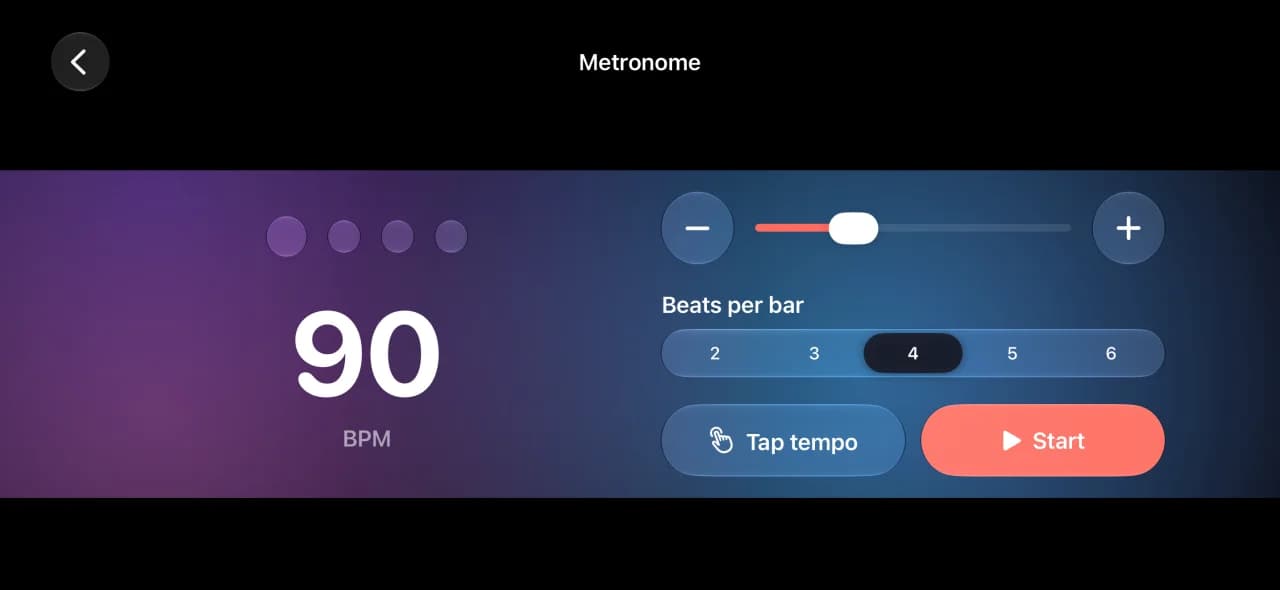
Set the tempo, the beats per bar and press play. The first beat of every bar is higher, louder and stronger in your hand, so you always know where the bar begins.
iPhone · iOS 18 or later · Android 9 or later
Simple and exact
40 to 220 BPM
From slow practice to fast passages; 90 BPM by default.
2 to 6 beats per bar
Marches, waltzes, 4/4 pop and 5/4 or 6/4 too.
An accent you can hear, see and feel
The first beat has a higher, louder click, a stronger haptic tap and its own coloured dot.
Tap tempo
Tap along to a song and the metronome takes the average of your last four taps; pause for two seconds to start again.
Practise with a metronome
Start slow
Pick a tempo where you can play every note cleanly.
Lock in
Play a few bars until your notes land on the clicks.
Step up
Raise the tempo a few BPM at a time.
Beats per bar
- 2
- 3
- 4
- 5
- 6
Free and Pro
Free
The whole metronome.
Pro
Nothing to unlock: tools are always free.
Questions
Does the metronome have subdivisions?
Not at the moment: it clicks every beat, with the first beat of the bar accented. The song player has its own count-in and drum backing.
How do I find the tempo of a song?
Tap the Tap button along with the beat. The metronome averages your last four taps and sets the BPM.
More in Melody+
Tuner
A chromatic tuner with guitar, bass, ukulele, violin family, banjo, mandolin, kalimba, zither and sax presets.
Chord library
25 guitar chords and 14 ukulele chords with diagrams and sound, a chord trainer, flash chords and What chord?.
Ear trainer
Hear a reference C, then find the mystery note on the keys: ten rounds, three note sets.
See also
Your first song is a few minutes away.
Pick up your piano, guitar, ukulele, saxophone or violin, open Melody+ and play a note. It will light up.


iPhone · iOS 18 or later · Android 9 or later