Piano
Learn piano on the piano you already have.
Play an acoustic piano, a digital keyboard or the keys on screen. Melody+ hears every note and chord, lights up what you got right and waits while you find the next one.
iPhone · iOS 18 or later · Android 9 or later
Made for real practice
Hears every note, even chords
Several notes at once are recognised through the microphone, so two-handed pieces count too. A MIDI keyboard over USB, Bluetooth or Wi-Fi gives the most precise timing.
Falling notes or sheet music
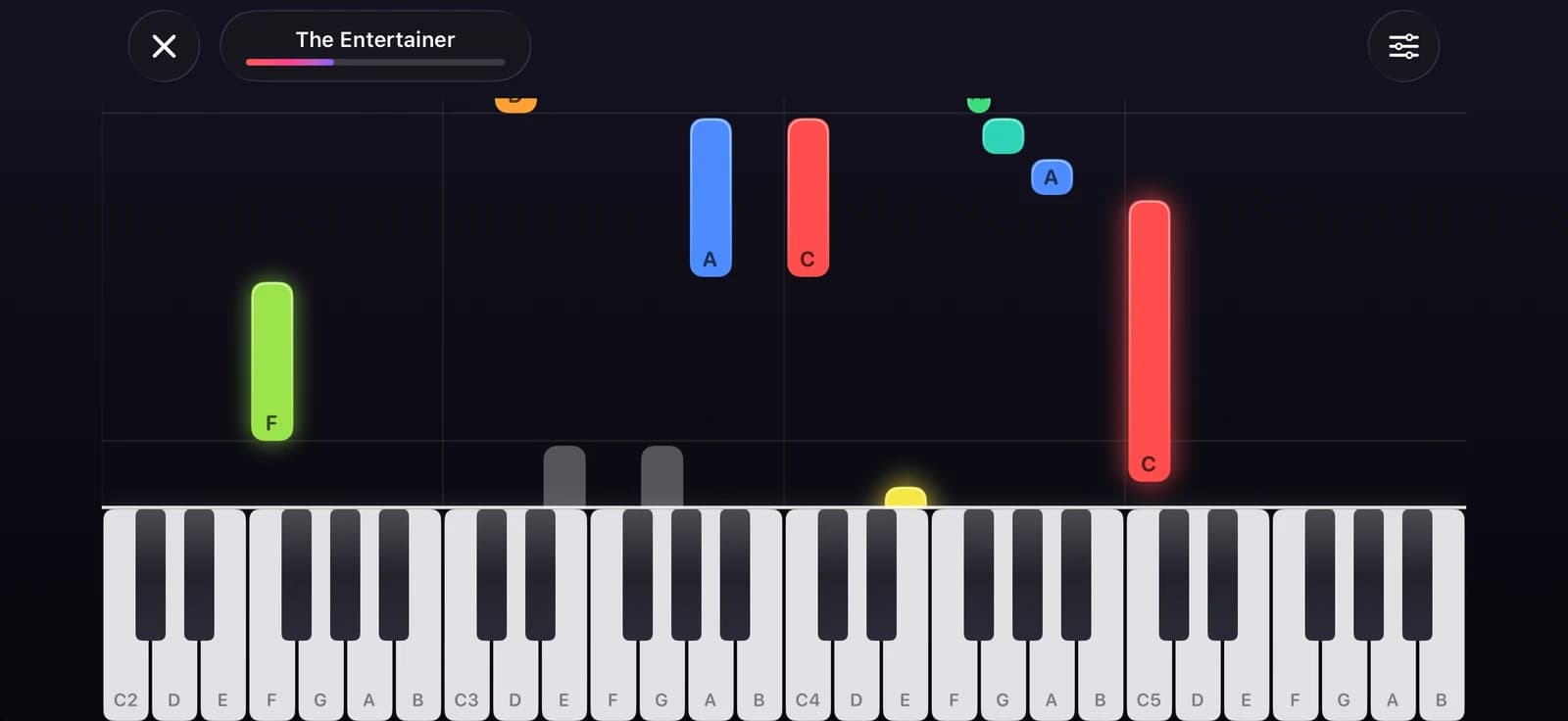
Start with glowing falling notes, then switch to a scrolling grand staff when you're ready to read.
Listen first, then your turn
In Listen mode the app plays the song with the keys lit up. Then it's your turn: choose Wait for me or play along.
Help when you're stuck
Lessons played along go part by part: miss three notes and you're counted back in at the start of that part. In Wait for me, after a few wrong tries Melody+ plays the note you're looking for.
Practise by part
Practise each section with the right hand, the left hand or both, and earn stars for every part.
Practise the hard part
Missed a star? Melody+ picks the hard part and slows it to 60%, then steps up to 75, 90 and 100% as you get it, before you play the whole song again.
How a song comes together
Listen
Hear the song once with the keys lit, so you know how it should sound.
Practise
Wait for me, one hand at a time, one part at a time, from 50 to 120% speed.
Play it through
Score up to 1,000 points and beat your personal best. The third star needs the song at full speed.
10 piano courses
- First Steps
- Reading the Staff
- Left Hand Basics
- Two Hands
- Both Hands Together
- Favourite Melodies
- Holiday Carols
- First Classics
- Classical Favourites
- Ragtime & Blues
Free and Pro
Free
The First Steps course, every beginner song and every practice mode (Listen, Wait for me, play along, by part, the hard part), with the microphone, a MIDI keyboard or the keys on screen.
Pro
The other nine piano courses and the full song library at every level.
Questions
Do I need a MIDI keyboard?
No. Melody+ listens to acoustic and digital pianos through your iPhone's microphone. A MIDI keyboard over USB, Bluetooth or Wi-Fi is optional and gives the most precise timing, and you can also play the multi-touch keys on screen.
Can I learn to read sheet music?
Yes. Switch the player from falling notes to sheet music at any time to follow a scrolling grand staff, and the Reading the Staff course teaches the notes step by step.
Why didn't I get three stars?
The third star needs the song at full speed. At a slower tempo you can earn up to two, and Melody+ offers to practise the hard part so you can work up to 100%.
Are songs available at different levels?
Many tunes come in several versions, from beginner to intermediate and advanced, so you can keep playing the same song as you improve.
More in Melody+
Guitar
Chords checked by the microphone, flash chords, What chord?, tab and a guided tuner with 8 tunings.
Electric Guitar
Plug in and play through an amp with four pedals, train bends and vibrato, and read tab with every technique.
Ukulele
4-line tab, ukulele chords checked by the microphone, island and chuck strums, and two courses.
Saxophone
Sheet music in written pitch with fingerings, a reed voice, a sax tuner, long tones and two courses.
Đàn tranh
A full-screen zither with Vietnamese modes, jianpu lessons and a mode that hears your own zither.
Drums
A full acoustic kit on your screen, with touch velocity, lessons that wait for you, backing loops and recording.
Beat Maker
16 pads in two banks, a step sequencer with swing, four kits, a kit builder and performance effects.
DJ Mixer
Two decks with turntables you can scratch, sync, key lock, Automix, effects, recording, a DJ course and a quiz.
Your first song is a few minutes away.
Pick up your piano, guitar, ukulele or saxophone, open Melody+ and play a note. It will light up.


iPhone · iOS 18 or later · Android 9 or later