Guitar
Clean chords, smooth changes, real songs.
From your first single notes to full strumming songs. Melody+ checks every note you pick and every strum against the chord you're meant to play, and drills the chord changes that make songs flow.
iPhone · iOS 18 or later · Android 9 or later
Everything a guitarist practises
Notes and chords, checked
Single notes are followed by pitch and strums are checked against the chord shape, so you know your fingers are in the right place.
Chord trainer
Strum a chord three clean times and the microphone checks each strum. Every chord in the library has its diagram and its sound.
One-minute switch
Change between two chords as often as you can in 60 seconds. Stars, slips and your personal best show how fast your changes are getting.
Flash chords
A chord appears and you strum it, then the next, for a whole minute. The chords come from the ones you've learnt, or the open chords to start with.
Warm-up before each lesson
Lessons with new chords start with a short warm-up: strum each new chord cleanly, then switch between the pair you'll change most. Skip it whenever you like.
What chord?
Strum anything and Melody+ names the closest chord in the library, shows its shape and suggests what else it could be.
Tab techniques and a guitar amp
Bends, slides, hammer-ons, pull-offs, palm mutes and harmonics are marked on the tab and played back in Listen. Plug in an electric guitar and play through the Guitar amp.
Guided tuner, 8 tunings
Tune string by string: it moves on once a string holds in tune and warns you when you play the wrong one. Tap a string to hear its note.
From tuning to the last strum
Tune up
The guided tuner takes you through each string in the tuning you choose.
Warm up
Strum the song's new chords cleanly, then drill the hardest change.
Play the song
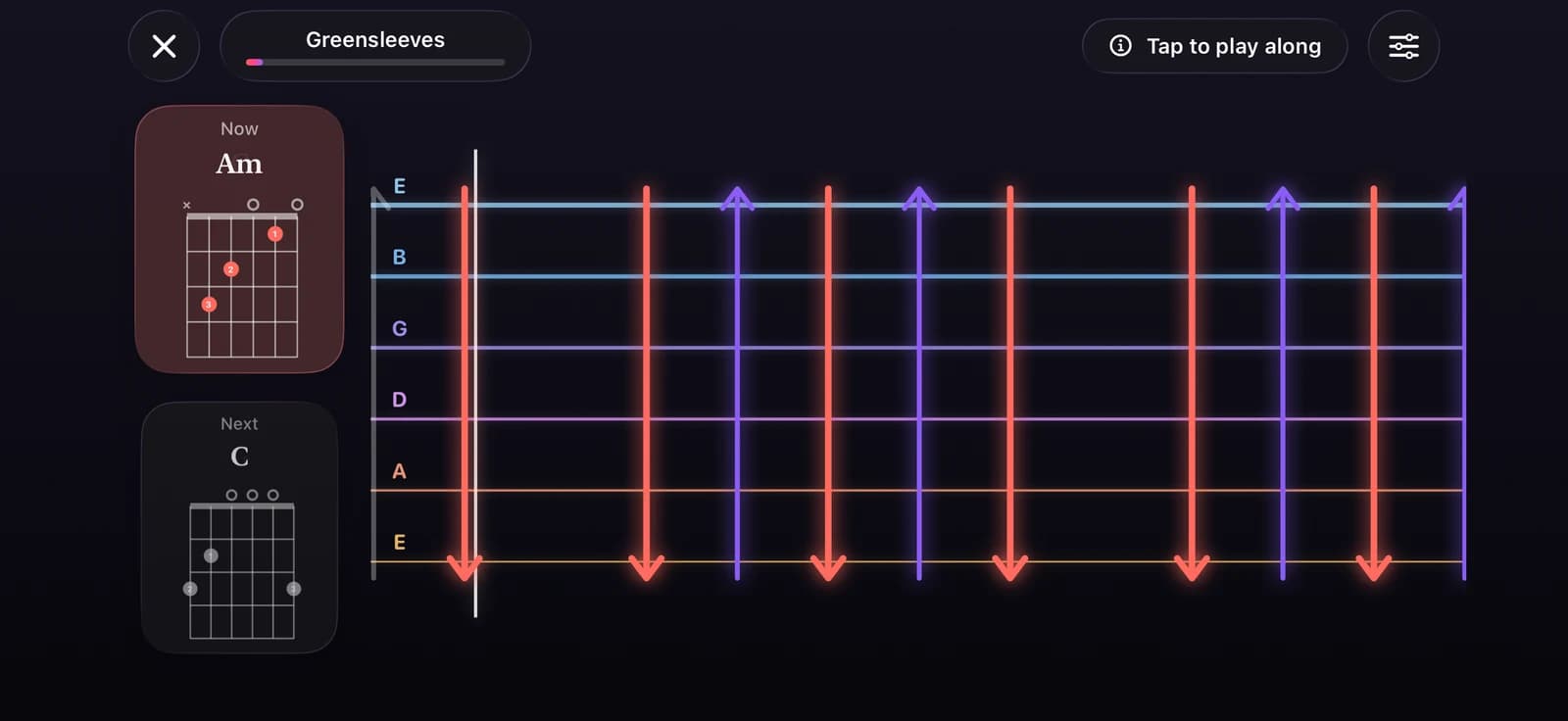
Follow scrolling tab with a chord card for now and next. Listen first, use Wait for me, or play along at tempo.
7 guitar courses
- First Steps
- First Chords
- Strumming Patterns
- Riffs and Melodies
- Campfire Songs
- Folk Classics
- Fingerpicking
8 tunings
- Standard
- Drop D
- Half step down
- Full step down
- Drop C
- Open G
- Open D
- DADGAD
Free and Pro
Free
The First Steps course, every beginner song, all practice modes, the guided tuner with every tuning, the chord library with the chord trainer, one-minute switch and flash chords, What chord?, strumming patterns, the Guitar amp and the Bends & vibrato trainer.
Pro
The other six guitar courses and the full song library at every level.
Questions
Does it work with acoustic and electric guitars?
Yes. Melody+ listens through your iPhone's microphone, so an acoustic guitar works as it is. Play an electric guitar through an amp or speaker the iPhone can hear, or plug it into an audio interface and play through the Guitar amp with wired headphones.
My chords aren't recognised. What can I try?
Tune first with the guided tuner: one string out of tune changes the chord. Then strum through every string of the chord and let it ring. A muted or buzzing string can make the chord sound different.
Can I use an alternate tuning?
Yes. The tuner has 8 guitar tunings: standard, Drop D, half step down, full step down, Drop C, Open G, Open D and DADGAD, plus its own presets for ukulele, đàn tranh, guzheng and saxophone. The courses and songs are written for guitar in standard tuning.
What are flash chords?
A one-minute drill in the chord library: a chord appears, you strum it, and the microphone checks it before the next one shows up. Your best score is saved, so you can watch your changes get faster.
More in Melody+
Piano
Falling notes, sheet music and lessons that listen to your real piano or keyboard.
Electric Guitar
Plug in and play through an amp with four pedals, train bends and vibrato, and read tab with every technique.
Ukulele
4-line tab, ukulele chords checked by the microphone, island and chuck strums, and two courses.
Saxophone
Sheet music in written pitch with fingerings, a reed voice, a sax tuner, long tones and two courses.
Đàn tranh
A full-screen zither with Vietnamese modes, jianpu lessons and a mode that hears your own zither.
Drums
A full acoustic kit on your screen, with touch velocity, lessons that wait for you, backing loops and recording.
Beat Maker
16 pads in two banks, a step sequencer with swing, four kits, a kit builder and performance effects.
DJ Mixer
Two decks with turntables you can scratch, sync, key lock, Automix, effects, recording, a DJ course and a quiz.
Your first song is a few minutes away.
Pick up your piano, guitar, ukulele or saxophone, open Melody+ and play a note. It will light up.


iPhone · iOS 18 or later · Android 9 or later