Drums
A whole drum kit under your fingers.
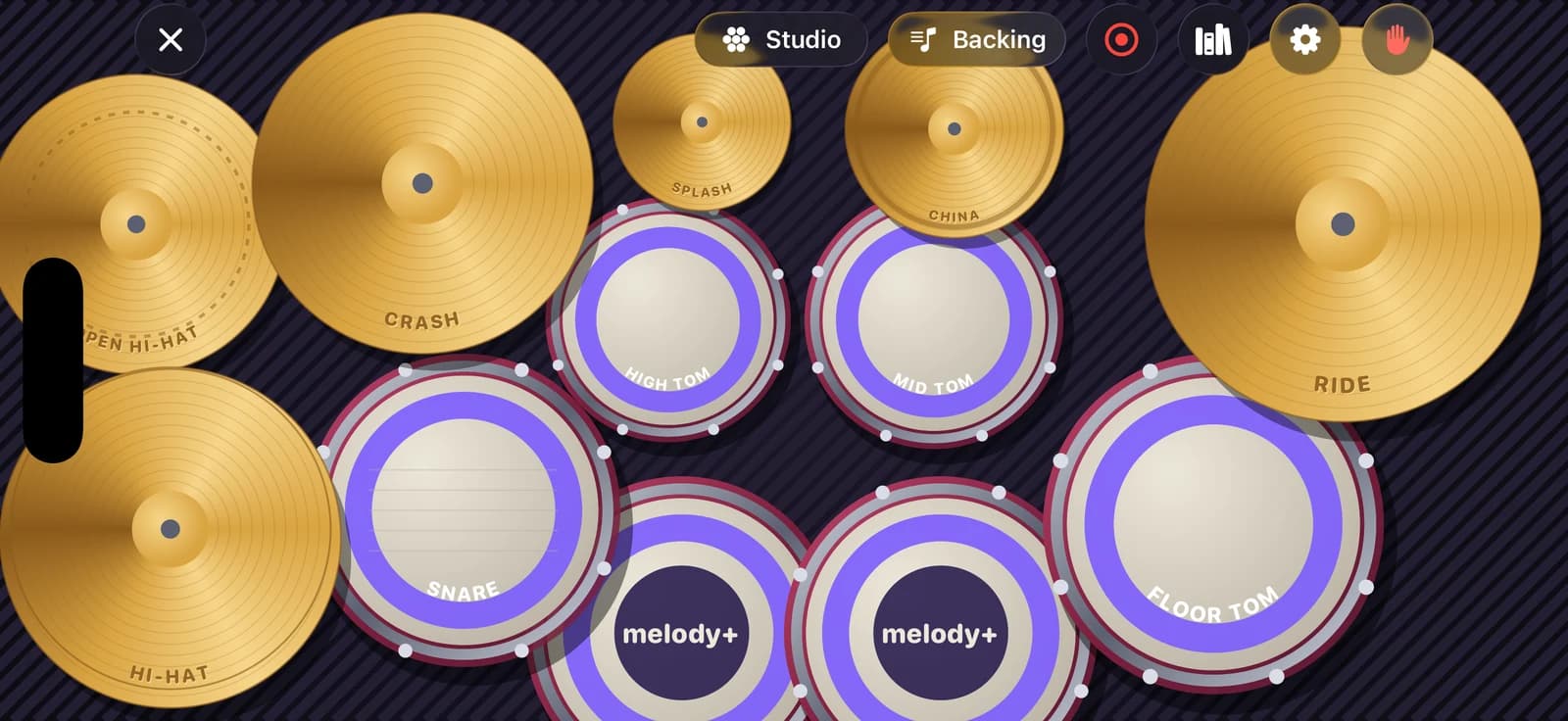
Eleven pieces fill the screen, from two kick pedals to a china cymbal. Hit harder to play louder, learn your first grooves in eight lessons that can wait for you, and jam over backing loops.
iPhone · iOS 18 or later · Android 9 or later
Feels like a real kit
The full kit, filling the screen
Kick with two pedals, snare, three toms, hi-hat, crash, ride, splash and china, each with its name on it if you like. Every sound is synthesised on your iPhone.
Touch velocity
Tap harder for louder hits. The edge of the snare plays a cross-stick and the middle of the ride is its bell.
Hold a cymbal to choke it
Keep your finger on a cymbal to stop it ringing, just like grabbing a real one.
Three kits, left or right
Studio, Jazz club and Rock arena, plus a left-handed layout that mirrors the whole kit. Reach level 5 for the Midnight finish.
Lessons that wait for you
Play a lesson in time, or switch to Wait for me: the groove waits until you've hit every drum of the next step, in any order, and counts the wrong drums.
Backing loops and recording
Play over rock, funk and ballad loops with bass and chords, coming in on one after a bar of count-in, then record yourself and share it from My recordings.
Mixer and electronic kits
Set the volume of each piece, and connect an electronic drum kit over USB or Bluetooth MIDI: every hit keeps its velocity.
How a drum lesson works
Listen
The groove plays first, so you hear what you're about to play.
Count in
A bar of clicks gets you ready to come in on one.
Play
Rings close in on the next drum to hit. Each hit is checked for timing and for the right drum, and your score earns stars. Too fast? Switch to Wait for me.
8 lessons
- Steady hi-hat
- Kick and snare
- Your first rock beat
- Push on the “and”
- Open hi-hat lift
- First tom fill
- Crash on one
- Ride groove
3 kits and 3 backing loops
- Studio
- Jazz club
- Rock arena
- Rock in E
- Funk in A minor
- Ballad in C
Free and Pro
Free
The whole drum kit: all 3 kits, the 8 lessons in time and with Wait for me, backing loops, recording, the mixer and electronic drum kits over MIDI.
Pro
Nothing to unlock on the kit. Pro adds sharing your recordings as 24-bit WAV.
Questions
Do I need a drum kit?
No. The kit fills your iPhone's screen and you play it with your fingers, with harder taps playing louder. If you have an electronic drum kit, connect it over USB or Bluetooth MIDI and play it through Melody+.
Which electronic drum kits work?
Kits that send standard General MIDI drum notes over USB or Bluetooth MIDI. Kick, snare, toms, hi-hat and cymbals are mapped automatically and every hit keeps its velocity. Melody+ shows when a kit is connected.
Can I play left-handed?
Yes. Turn on Left-handed in the kit's settings and the whole kit, and its stereo placement, is mirrored.
How does Wait for me work on drums?
The lesson stops at each step until you've hit every drum it needs, in any order. Hitting the same drum twice doesn't count against you, a wrong drum does, and your stars come from how few slips you make.
Where do my drum recordings go?
To My recordings on your iPhone. They aren't uploaded anywhere; share one only if you want to.
More in Melody+
Piano
Falling notes, sheet music and lessons that listen to your real piano or keyboard.
Guitar
Chords checked by the microphone, flash chords, What chord?, tab and a guided tuner with 8 tunings.
Electric Guitar
Plug in and play through an amp with four pedals, train bends and vibrato, and read tab with every technique.
Ukulele
4-line tab, ukulele chords checked by the microphone, island and chuck strums, and two courses.
Saxophone
Sheet music in written pitch with fingerings, a reed voice, a sax tuner, long tones and two courses.
Đàn tranh
A full-screen zither with Vietnamese modes, jianpu lessons and a mode that hears your own zither.
Beat Maker
16 pads in two banks, a step sequencer with swing, four kits, a kit builder and performance effects.
DJ Mixer
Two decks with turntables you can scratch, sync, key lock, Automix, effects, recording, a DJ course and a quiz.
Your first song is a few minutes away.
Pick up your piano, guitar, ukulele or saxophone, open Melody+ and play a note. It will light up.


iPhone · iOS 18 or later · Android 9 or later