DJ Mixer
Two decks. Your mix.
Spinning turntables, colour waveforms and a real mixer. Melody+ finds the tempo, the beats and the key for you, so you can focus on the blend, a guided course shows you how, and Automix keeps the music going when you step away.
iPhone · iOS 18 or later · Android 9 or later
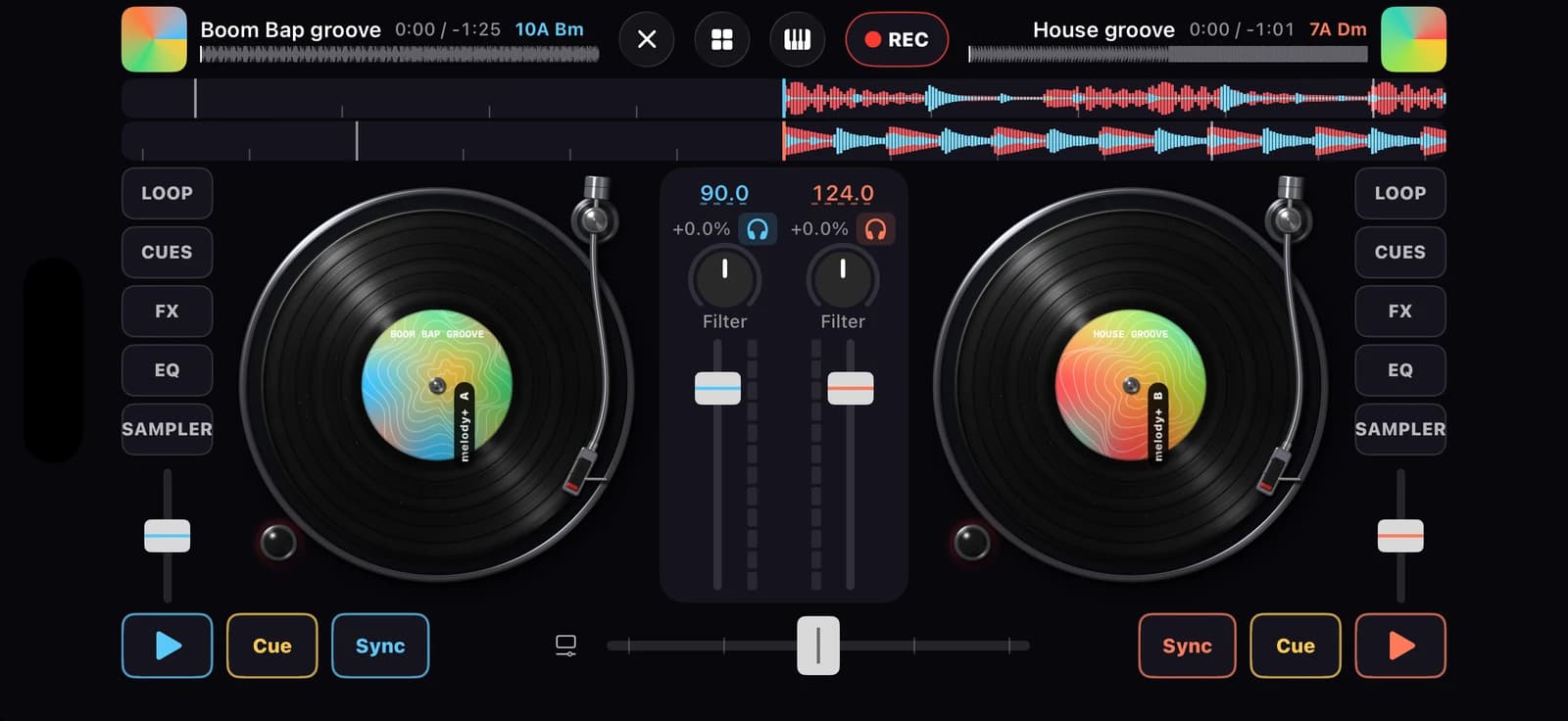
A full console
Turntables you can scratch
Platters spin at the track's speed. Turn on vinyl mode and touch the record to scratch, backwards or with the deck paused; the outer rim nudges the tempo. At level 3 you unlock neon turntables.
BPM, key and key lock
Every track is analysed on your iPhone. Keys are shown in Camelot notation for harmonic mixing, Sync locks the tempos together and key lock keeps a track's pitch when you change its tempo.
3-band waveforms and meters
Lows, mids and highs in their own colours scroll past the playhead, with beat and bar lines. Channel meters hold their peak and warn you when the signal clips.
EQ, kills and filter
Three-band EQ with kills on each deck, a one-knob filter and crossfader curves from smooth to cut.
Hot cues, loops, roll and slip
Eight hot cues per deck, loops from 1/8 to 16 beats, beat jumps and rolls. With slip on, the track keeps running underneath and lands in time when you let go. The Essential layout gives each deck four big hot-cue pads.
Effects and sampler
Six effects on an X/Y pad for each deck, and eight sampler pads firing kicks, claps, hats and crashes over your mix.
Automix
Choose the tracks, or shuffle them, and Automix mixes each one into the next on the beat with a fade, a filter sweep or a bass swap, and shows what's coming next.
Pre-cue in your headphones
With wired or USB headphones, hear the mix in one ear and the deck you're cueing in the other, so you can line up the next track before anyone hears it.
Your music, your recordings
Import your own non-DRM tracks from the Files app or start with practice grooves made in the app, then tap REC to record your mix and share it from My recordings.
Your first mix
Load two tracks
Pick a practice groove or a track of your own for each deck.
Sync and blend
Lock the tempos, cue the next track in your headphones, then crossfade, swap the bass and sweep the filter.
Add your touch
Drop hot cues, loops, rolls, scratches and effects, and record the mix.
DJ course: 6 lessons and a quiz
- Your first mix
- Bass swap
- Loops
- Hot cues
- Filter sweep
- Beatmatch by ear
- DJ quiz
6 effects
- Echo
- Reverb
- Flanger
- Phaser
- Gate
- Bitcrush
Automix transitions
- Fade
- Filter sweep
- Bass swap
Free and Pro
Free
2 decks, the full mixer (EQ, filter, crossfader, sync, key lock), loops, beat jump, roll and slip, scratching, hot cues 1–4, Echo, Reverb and Gate, the sampler, Automix, pre-cue, your own files, mix recording up to 10 minutes (always saved), DJ course 1 and the DJ quiz.
Pro
Every effect, hot cues 5–8, unlimited mix recording and 24-bit WAV sharing.
Questions
Can I mix my own music?
Yes. Tap Load › From Files… to import tracks you own, such as MP3, AAC, WAV, AIFF or FLAC files. Copy-protected (DRM) songs, including downloads from streaming services, can't be opened. Imported tracks are analysed and kept on your iPhone only.
How does the DJ course teach?
Each lesson dims the screen around the control to use next and tells you what to do. When you've done it, the lesson moves on, and a short congratulations leads to the next lesson.
What does Automix do?
Pick a few tracks in the library, or shuffle them, and choose a transition and its length in beats. Automix loads the next track, starts it on the beat before the current one ends and blends them with a fade, a filter sweep or a bass swap, until you stop it.
Why does Sync not work on a track?
Sync needs a beat grid. Some music, such as free-tempo or very quiet pieces, has no steady beat to find. You can still match the tempo by ear with the tempo fader.
Do I need headphones?
Not to get started: the iPhone speaker works for the DJ course and the practice grooves. Wired or USB headphones help you hear the kick and the bass clearly and let you pre-cue the next track in one ear. Pre-cue is off while you record, and Bluetooth headphones add a delay.
More in Melody+
Piano
Falling notes, sheet music and lessons that listen to your real piano or keyboard.
Guitar
Chords checked by the microphone, flash chords, What chord?, tab and a guided tuner with 8 tunings.
Electric Guitar
Plug in and play through an amp with four pedals, train bends and vibrato, and read tab with every technique.
Ukulele
4-line tab, ukulele chords checked by the microphone, island and chuck strums, and two courses.
Saxophone
Sheet music in written pitch with fingerings, a reed voice, a sax tuner, long tones and two courses.
Đàn tranh
A full-screen zither with Vietnamese modes, jianpu lessons and a mode that hears your own zither.
Drums
A full acoustic kit on your screen, with touch velocity, lessons that wait for you, backing loops and recording.
Beat Maker
16 pads in two banks, a step sequencer with swing, four kits, a kit builder and performance effects.
Your first song is a few minutes away.
Pick up your piano, guitar, ukulele or saxophone, open Melody+ and play a note. It will light up.

iPhone · iOS 18 or later · Android 9 or later