Beat Maker
Tap out a beat in seconds.
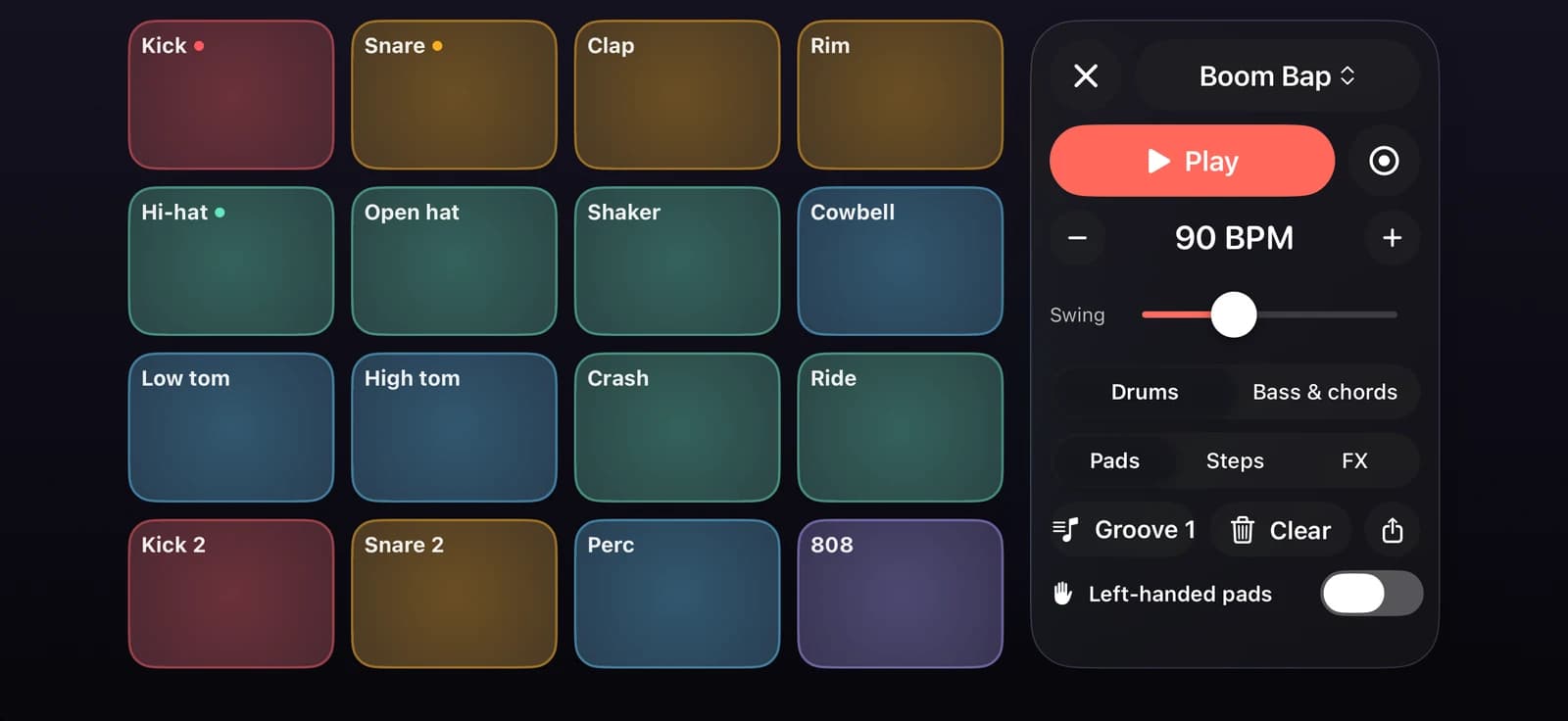
Sixteen pads, two banks and four kits made right on your iPhone, or a kit you build yourself. Play live, program the steps, add swing and effects, then share your beat or mix it in the DJ Mixer.
iPhone · iOS 18 or later · Android 9 or later
A beat studio in your pocket
16 pads, two banks
Drums on one bank, bass and chords on the other: 32 sounds under your fingers, in stereo. Left-handed? Mirror the pad grid.
Four synthesised kits
Boom Bap, Trap, House and Lo-fi are generated on the device, with no samples to download. Swap kits while the beat keeps playing.
Kit builder
Start from any kit, give each drum pad one of 21 synthesised drum sounds and set its pitch, decay, level and pan, hearing it as you go. Save it to My kits and play it like any other kit.
Step sequencer with swing
Tap steps on the 16-step grid, set the tempo and add swing for a looser, more human feel.
Live record with quantise
Tap Record and play the pads over the loop. Every hit snaps to the grid.
Performance effects
Echo, Reverb, Flanger, Phaser, Gate and Bitcrush on an X/Y pad: drag sideways for the timing, up and down for the amount, and Hold to keep it on.
Export and share
Bounce your beat to AAC, or 24-bit WAV with Pro, and share it, or load it on a DJ deck with its exact tempo.
Rhythm course
Twelve lessons from a steady pulse to your first fill. Listen, then play, with every hit graded Perfect, Good, Early, Late or Miss, and a cheer when your streak of clean hits grows.
Beat Tiles
Tap the falling tiles in time on four songs, hold the long chord and bass tiles to the end, build combos and collect stars.
From first tap to finished beat
Pick a kit
Choose a kit and a tempo, start from one of its grooves, or build a kit of your own.
Build the loop
Program steps on the grid or record live on the pads.
Make it yours
Ride the effects, save your beat and share it.
4 kits
- Boom Bap
- Trap
- House
- Lo-fi
12 Rhythm lessons
- Steady pulse
- The backbeat
- Kick and snare
- Eighth-note hats
- Rock beat
- Syncopated kick
- Four on the floor
- Off-beat hats
- Sixteenth hats
- Boom bap
- Ghost notes
- Your first fill
Free and Pro
Free
Sequencer and pads (left-handed too), the Boom Bap and Lo-fi kits (Trap unlocks for free after 6 Rhythm lessons), the kit builder, Echo, Reverb and Gate, 3 saved beats, AAC sharing, Rhythm course 1 and the 4 Beat Tiles songs.
Pro
Every kit and effect, unlimited saved beats and 24-bit WAV sharing. You can try a locked effect for 10 seconds first.
Questions
Are the sounds samples I have to download?
No. Every kit is synthesised on your iPhone, so there is nothing to download and the kits change instantly, even while the beat plays.
Can I make my own kit?
Yes. Open the kit menu, choose Build a kit from this one, then pick a sound for each drum pad and set its pitch, decay, level and pan. Chord and bass pads keep their notes; you set their level and pan. Your kits appear under My kits.
Can I use my beats in the DJ Mixer?
Yes. Beats you export show up in the DJ Mixer's library with their exact tempo, ready to sync with another track.
What happens when I save a fourth beat on the free plan?
Free keeps three saved beats. When you save another, you can replace the oldest one or go Pro for unlimited beats. Nothing is deleted without asking.
Pads feel late with Bluetooth headphones.
Bluetooth adds a delay you can hear when you tap a pad. Use wired headphones or the iPhone speaker for Beat Maker and the Rhythm course. Melody+ warns you when the audio route adds a lot of delay.
More in Melody+
Piano
Falling notes, sheet music and lessons that listen to your real piano or keyboard.
Guitar
Chords checked by the microphone, flash chords, What chord?, tab and a guided tuner with 8 tunings.
Electric Guitar
Plug in and play through an amp with four pedals, train bends and vibrato, and read tab with every technique.
Ukulele
4-line tab, ukulele chords checked by the microphone, island and chuck strums, and two courses.
Saxophone
Sheet music in written pitch with fingerings, a reed voice, a sax tuner, long tones and two courses.
Đàn tranh
A full-screen zither with Vietnamese modes, jianpu lessons and a mode that hears your own zither.
Drums
A full acoustic kit on your screen, with touch velocity, lessons that wait for you, backing loops and recording.
DJ Mixer
Two decks with turntables you can scratch, sync, key lock, Automix, effects, recording, a DJ course and a quiz.
Your first song is a few minutes away.
Pick up your piano, guitar, ukulele or saxophone, open Melody+ and play a note. It will light up.

iPhone · iOS 18 or later · Android 9 or later